The CDP Flood: A Layer 2 Denial-of-Service Demo and How to Defend Against It
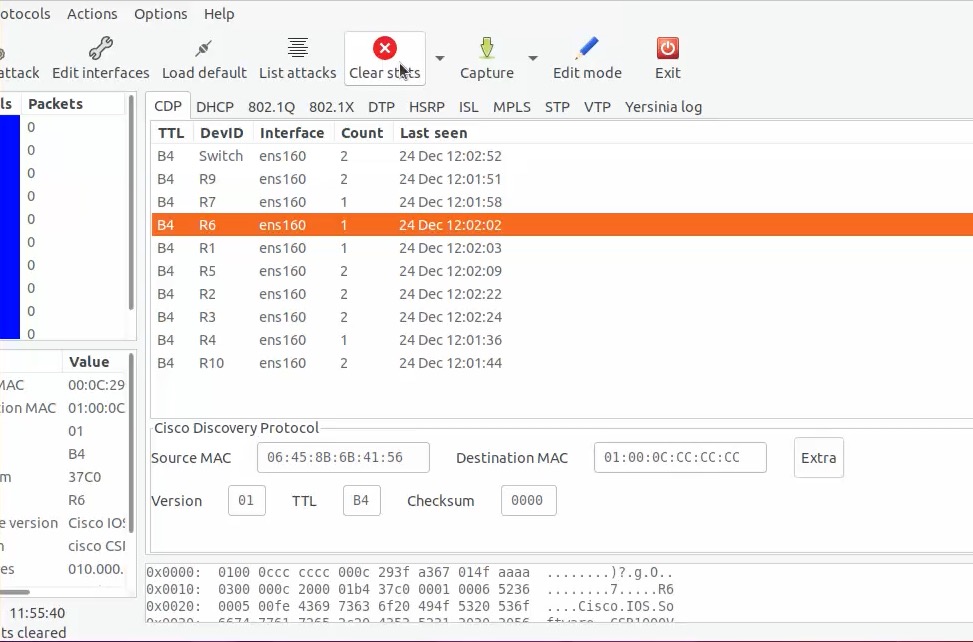
1. The lab
The demonstration runs in an isolated virtual lab built on VMware ESXi, with
Cisco CSR 1000V routers (R1–R10) and a Catalyst switch, reached over
SSH, and a Linux host running a Layer 2 attack tool attached to the same segment (interface ens160).
Nothing here touches a production network. That matters, and we come back to it at the end.
2. What CDP is — and why it is a target
The Cisco Discovery Protocol is a Layer 2 protocol that Cisco devices use to announce themselves
to their direct neighbours: device ID, model, IOS version, the port they are connected through, native VLAN and more.
It is convenient for mapping a network — and for the same reason it is a gift to an attacker. CDP frames are sent
to the multicast address 01:00:0C:CC:CC:CC, they are not authenticated, and by default a switch believes
every one it receives.
Before the attack, the neighbour table is small and real — the lab switch and routers
R1–R10:
R7# show cdp neighbors
Device ID   Local Intrfce   Holdtme   Capability   Platform    Port ID
Switch      Gig 1/0/1       168       S I          WS-C3750G   Gig 2/0/1
R10         Gig 1           178       R I          CSR1000V    Gig 1
R2          Gig 1           154       R I          CSR1000V    Gig 1
...
Total cdp entries displayed : 11
3. The attack: flooding CDP
The attack tool offers a “flood CDP table” function. One action and the host begins emitting a torrent of CDP frames, each with a randomly generated device ID and source MAC address. Within moments the neighbour table is full of devices that do not exist:
TTL   DevID      Interface   Count   Last seen
FF    BPPPPPP    ens160      1       24 Dec 12:04:17
FF    YYYYYYY    ens160      1       24 Dec 12:04:17
FF    TTTBBBB    ens160      1       24 Dec 12:04:17
FF    K222222    ens160      1       24 Dec 12:04:17
FF    NNNNNNN    ens160      1       24 Dec 12:04:17
...
12:04:17). The frames are emitted thousands per second, so the table fills and the
network starts to suffer almost the instant the attack begins. There is no slow build-up to notice and react to; it is
immediate.
4. The impact
CDP processing happens in software on the route processor. Flooding thousands of unique advertisements forces each device to parse, store and age them continuously, and the cost shows up directly as CPU. In the demonstration, the routers’ CDP Protocol process climbs from idle to a large share of the CPU:
R1# show processes cpu sorted | include CPU | PID Runtime | CDP Protocol
CPU utilization for five seconds: 68%/13%; one minute: 53%; five minutes: 22%
 PID  Runtime(ms)   Invoked      5Sec     1Min     5Min   Process
 570  73245         300          41.54%   48.65%   19.70%  CDP Protocol
On real hardware with many ports and neighbours, a sustained flood can starve the control plane of CPU — delaying or dropping the legitimate control traffic that keeps the network converged (routing adjacencies, spanning tree, management). That is the denial of service: not a dramatic crash, but a network slowly choking on fake discovery data.
5. The defence
CDP flooding has a clean answer: CDP is almost never needed on an access port, and where it is not needed it should be off. Everything else is defence-in-depth around the same idea.
Turn CDP off where it is not needed
! Disable CDP entirely (if nothing depends on it)
Switch(config)# no cdp run

! Or leave it on for infrastructure links, off on access/edge ports
Switch(config)# interface range Gi1/0/1 - 48
Switch(config-if-range)# no cdp enable
In the demonstration, this is exactly the lever that is pulled — no cdp run on the routers, after
which show cdp neighbors reports “CDP is not enabled” and the flood has nothing to land on.
Harden the access edge so one port cannot do this
| Control | What it stops |
|---|---|
Port security — switchport port-security maximum 2, violation shutdown | Caps the number of MAC addresses a port may learn. A host spraying thousands of random source MACs trips the violation and the port is err-disabled — which also tells you exactly where the attack is. |
BPDU Guard — spanning-tree bpduguard enable | Shuts a port the instant it sees a rogue BPDU, killing spanning-tree attacks. |
| DHCP Snooping + Dynamic ARP Inspection | Stops DHCP starvation / rogue-server and ARP-spoofing attacks from the same class of toolkit. |
Disable DTP — switchport mode access, switchport nonegotiate | Prevents DTP negotiation and 802.1Q VLAN hopping. |
Storm control — storm-control broadcast level 1.00 | Caps any flood that slips past the controls above. |
interface range Gi1/0/1 - 48
 switchport mode access
 switchport nonegotiate
 no cdp enable
 spanning-tree portfast
 spanning-tree bpduguard enable
 switchport port-security
 switchport port-security maximum 2
 switchport port-security violation shutdown
 switchport port-security aging time 2
 storm-control broadcast level 1.00
err-disable within seconds — which both stops the attack
and pinpoints the source port in your logs. If the port instead stays up and the neighbour table fills with
strangers, you have your finding.
6. Why this matters beyond the lab
Layer 2 is the floor the whole network stands on, and it is frequently the least-hardened layer because the protocols involved are old, chatty and “just work.” Attack tools exist to prove that those defaults are a liability. The lesson is not the tool — it is that every trust a switch extends by default is a control you have to make a conscious decision about: which ports speak CDP, how many MACs a port may learn, whether a port may become a trunk, who is allowed to be the root bridge. Decide each one on purpose, and the whole class of attacks closes.
The convenience trap
The deeper exposure is rarely technical — it is habit. CDP is enabled by default, it makes troubleshooting and network mapping effortless, and IP phones rely on it for voice-VLAN and PoE negotiation, so it quietly stays on everywhere and is never revisited. Meanwhile, every building holds a reserve of live wall jacks: the lobby, the empty conference room, the socket behind a printer, the desk no one sits at — each patched back through an access switch that uplinks to the core.
The two habits meet badly. A contractor, a visitor left alone in a meeting room, an insider with a few unobserved minutes — anyone who can reach a jack is a single cable from the core, with CDP already enabled to answer. The weakness is almost never the protocol in isolation; it is a trusted protocol, left on for comfort, reachable from an untrusted port. Turn it off where it earns nothing, and treat every accessible jack as hostile until port security, 802.1X and the rest of the baseline have proven otherwise.
Related
References
- Cisco — Configuring CDP
- Cisco — Configuring Port Security